Spatiotemporal data for Deep Learning in HDF5
Loading data can become a bottleneck in training deep learning models. Here we provide some speed comparisons for spatiotemporal data storage.
tl;dr
JPEG offers good compression for images but reading spatiotemporal data
(image sequences) from disk can be slow. Images are also limited to 8bits per channel.
HDF5 is faster, offers higher bit-depth but saves less space and requires some tweaking.
Spatiotemporal data consist of 2 or 3 spatial dimensions and there is also the dimension of time. They come in all sorts of flavors like video, traffic, temperature etc. Personally I am interested in predicting physical dynamical systems. In my last project, I was working with simulations of wave propagation. The data came in JPEG format, where each simulation would be a series of files. You can see an example of a data sequence below, and if you want to know a bit more about that work check this paper and code.
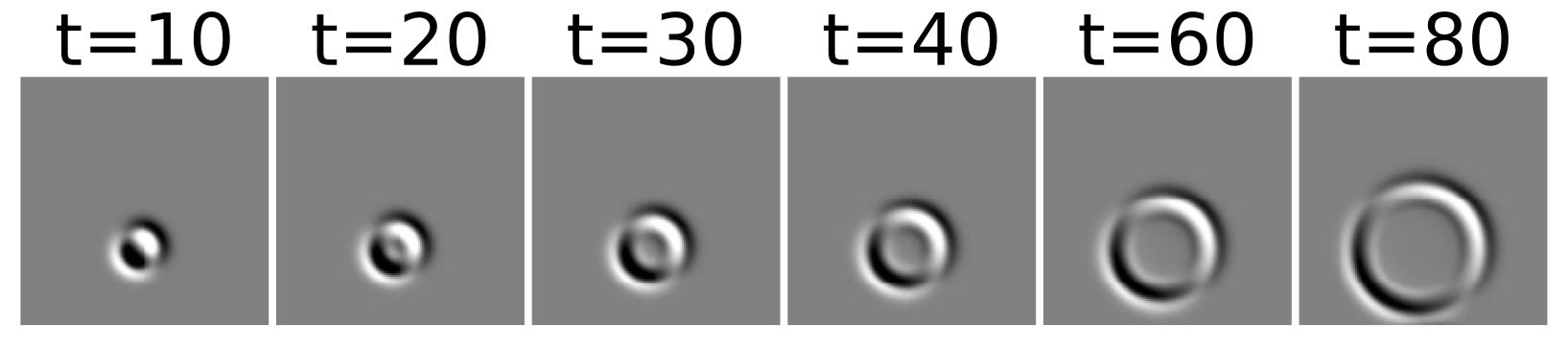
While I was using the data “as is” at the time, I started wondering whether JPEG files were the right format of storage. This was triggered because I noticed that during training, loading data was the main bottleneck. I am using pytorch and the provided DataLoader class does an extremely good job of pre-fetching data but increasing the number of workers didn’t seem to solve the problem, it even made it worse. There are also other concerns. The artefacts that JPEG introduces, while barely visible to the human eye, can also be quite important for your network. Another issue is normalization. Pixel values are in the 0-255 range. This means that the normalization needs to be known before hand but this is not always possible and might need to clipping or loss of “dynamic range”.
Data formats
In the pre-dataloader era the right format for data storage in deep learning was not obvious. One natural choice is storing image files in JPEG files. JPEG offers a significant compression over raw image data. This is also applicable to short videos, which after all are just sequences of images. The downside is that loading image files one by one takes long if you load many of them at once. Python has various libraries that can deal with loading images like pillow.
Another popular way of storing images and videos is Hierarchical Data Format (HDF5). It a nutshell, HDF5 is good for big datasets with hierarchical structure. It only offers generic compression like GZIP and LZF. In python the h5py library offers support for HDF5.
Speed comparison
Saving snapshots in JPEG is straighforward but HDF5 has its quirks. There are a couple of variable that play a big role on the read/write speed of the dataset: chunking, compression, filesize.
All datasets are comprised of 3000 datapoints, where each datapoint is a sequence of $100$ frames and each frame is a $184 \times 184$ array. A batch contains 10 randomly chosen datapoints ($10\times 100\times 184\times 184$). To compare the different data formats, I fetch 10 batches, so 100 datapoints in total, and report the time it takes per datapoint. I also compare the time for 1,2,4 and 8 workers. For reference, all tests were conducted on a system equipped with a mid-range quad-core i-7 and a decent SSD.
Here’s a summary of the results and following some analysis.
| Format | Chunks | Compression | Size | Time - 1 worker | 2 workers | 4 workers | 8 workers |
|---|---|---|---|---|---|---|---|
| JPEG | - | - | 2.4G | 0.173 | 0.123 | 0.085 | 0.079 |
| HDF5 | Auto | LZF | 19G | 2.449 | 1.413 | 1.02 | 0.812 |
| HDF5 | Manual | LZF | 17G | 0.041 | 0.022 | 0.013 | 0.013 |
| HDF5 | Manual | GZIP | 12G | 0.067 | 0.035 | 0.022 | 0.019 |
Correct chunking in HDF very important
Chunking is a very important concept in HDF. I used two different methods, the first is auto-chunking. With this setting it takes 1.02 seconds with 4 workers to fetch a datapoint, which is slow. I set the chunk equal to the size of a datapoint ($100\times 184\times 184$ ).
hdf5_store = h5py.File(filename, "w")
images = hdf5_store.create_dataset('images', (num_datapoints,100,184,184), chunks=(1, 100, 184, 184), compression='gzip')
This made it dramatically faster and only took 0.013 seconds to fetch a datapoint, a 78x speed-up! If you have structured data and you know how much you’ll be fetching each time make sure to use that knowledge to your benefit.
HDF5 with correct chunking is faster than JPEG
JPEG might be more straightforward to use than HDF5 but it’s also slower. It takes 0.085 second on average for a JPEG-based dataloader to bring a datapoint. On the other hand, HDF5 only needs 0.013 seconds, more than 6.5x faster.
Compression
HDF allows three types of compression: LZF, GZIP and SZIP. For GZIP you can adjust the compression strength from 1 to 9, where 1 is the least compression. JPEG also compresses images using the DCT encoding. JPEG is by far the best compression for this dataset, taking only 2.4GB. Probably because the dataset has a lot of constant intensity regions that JPEG is good with. HDF5 the takes much more space, GZIP and correct chunking help a bit but only manage to reduce the size to 12G. In terms of speed HDF5 with LZF compression and manual chunking is the fastest. HDF5+GZIP is second fastest, so if disk space is a concern it’s worth considering.
HDF File size
I was also wondering if packing more datapoints in one file plays any role in the read speed of HDF5 files. The results in the table below. Apparently, if you do your chunking correct, bigger files are as fast as smaller ones, if not faster.
| Format | Chunks | Datapoint | Size | Time - 1 worker | 2 workers | 4 workers | 8 workers |
|---|---|---|---|---|---|---|---|
| HDF5 | Auto | 3000 | 19G | 2.449 | 1.413 | 1.02 | 0.812 |
| HDF5 | Auto | 500 | 2.1G | 1.688 | 0.977 | 0.695 | 0.517 |
| HDF5 | Manual | 3000 | 17G | 0.041 | 0.022 | 0.013 | 0.013 |
| HDF5 | Manual | 500 | 2.6G | 0.051 | 0.027 | 0.016 | 0.015 |
Increasing number of workers has limitations
Increasing the number of workers works well up to a certain extent. The speed-up is sublinear, using 4 instead of 1 worker is not 4x faster but rather 2.5-3x. Additionally, in most cases, using more than 4 workers does not provide any further gains.
HDF5 vs JPEG
Pros
- Whole dataset in one file (important for staging)
- Various compression schemes
- Pretty fast if tweaked properly
- Raw data with “unlimited” range
Cons
- Suboptimal compression for natural images/video
- Need to fiddle with chunking
- Learning curve for API